Step 1. Choose how customers contact you
A call link is suitable if you answer by phone. A messenger link is suitable if that channel is actually serviced. A form is convenient for requests outside working hours but requires a handler and recipient. The link mailto: opens visitor's mail but does not send the letter itself.
Request is not a time reservation. If the service provider still needs to confirm the time, the button is labeled "Submit request," and the message explains waiting for a response. A real booking for a free slot requires scheduling, saving the reservation, and protection against double bookings. Do not add a calendar that only looks functional.
Step 2. Build the pages
Use for the form Detailed instructions for creating and testing an enquiry form. After completing it, return to checking the entire site. This instruction example shows training processing; your hosting delivery must be checked separately.
Step 3. Check the request
Codex checks call and messenger addresses, sends an agreed test enquiry, and verifies it with the recipient via available dashboard or connection. Fictional data is used. You confirm the correctness of the real contact. If Codex cannot access the delivery dashboard, it asks to show only the needed test record; this is not replaced by a 'Sent' message on the site.
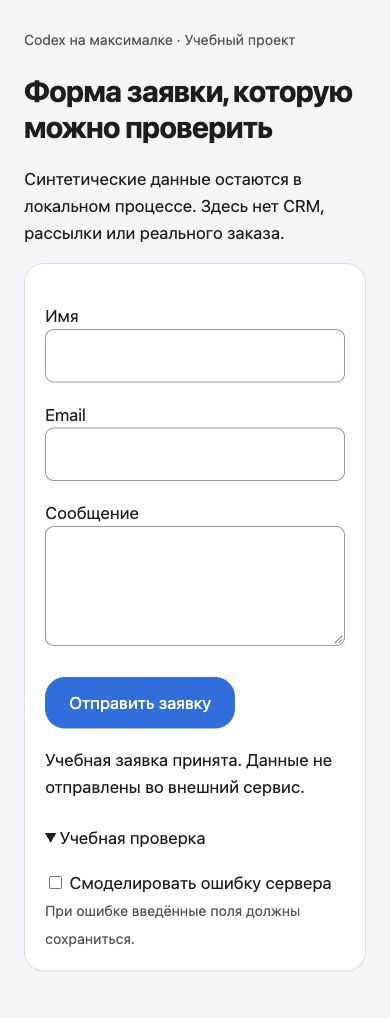
The screenshot of the sample form helps compare field placement. It does not prove that your inquiry was delivered.
Step 4. If the enquiry did not arrive
Ask Codex to check the handler's response and delivery log. Ensure the correct recipient is chosen and spam folder checked. Save errors without personal data. Don't proceed with a form that only simulates success.
What you will have
The pages are built and the enquiry method is tested through to the recipient.
Next: Check the site as a real visitor would.
Prompt for Codex
Paste into your project chat:
Build the agreed pages and customer booking method. First clarify who receives enquiries and where they are stored. Test the form using sample data, including errors and retries; separately verify actual delivery to the chosen recipient.
