Open the working project and describe one change you need. First, save the current version and check the existing actions.
Paste the prompts in order into Codex or Work with access to these materials.
Step 1. Find the current project
Find the current site's source files first. Ask Codex to run a separate copy and show the working features; these will be the reference when checking the change.
Find the task materials and fill the bracketed fields yourself from them.
Find the website project at [folder and URL]. Check files, startup and current version. Open a working copy and list existing problems separately.
Step 2. Agree on the change
Describe one new action, such as adding a form field. List what must stay: existing fields, enquiry submission and page URLs.
You can choose a design before implementation in the free Kombai gallery: forms and Navbar navigation. You do not need a Kombai account or subscription to browse and send a reference to Codex.
Open the gallery, choose a page or an individual element, open its card and view Live preview. Copy the card link or use the Use in other agents button to copy its prompt. Send it to Codex with your task. Detailed instructions and limitations.
Paste this into Codex for your chosen reference:
Find the project and task materials. Read the project instructions and my materials.
Use this design as a reference: [link to the Kombai card or Live preview].

My task: change the agreed block on a working website.
Content and functions: my existing copy and actions, plus the new function in the task.

Take the link from my message; if none is provided, ask me to choose a reference. Find the other details in the project and ask about anything missing.
Open the reference and study its composition, colors, typography, spacing, images and element behavior. Adapt the design to my task and project stack. Keep its character and replace demo copy and data with mine. If HTML is available from Live preview, examine it and use suitable parts as a starting point. If the source is unavailable, say so and implement from the available reference.
Apply the reference only if the change affects design. Save the version and preserve addresses, fields and working functions. Change only the agreed block and repeat the existing flow.
Check desktop and mobile layouts, run the project locally and show the result. Ask about missing product facts; do not invent them.
Find the task materials and fill the bracketed fields yourself from them.
For [new feature], agree on the user's action, result and checks. List content, fields, URLs and functions that must remain unchanged.
Step 3. Save and test the baseline
Save the working version before changing it. Test a sample submission and an error so you can distinguish a new problem from an existing one.
Find the task materials and fill the bracketed fields yourself from them.
Save the pre-edit version of [project]. With the same sample data, test the existing flow, errors and retries. Prepare a code rollback that preserves new data.
Step 4. Trace the data flow
A new field may affect more than the screen. Codex should find where its value is checked, stored and shown to the recipient.
Find the task materials and fill the bracketed fields yourself from them.
Trace [new feature] through the UI, request, handler, storage and recipient where present. Check compatibility with old requests; identify any separate access needed.
Step 5. Implement the change
Make the agreed change in the site copy. Check the intermediate result: the new action should work alongside the existing ones.
Find the task materials and fill the bracketed fields yourself from them.
Apply [agreed change] to the project copy. Reuse existing solutions and change only what is needed. Test the intermediate result before updating the live site.
Step 6. Test new and old flows
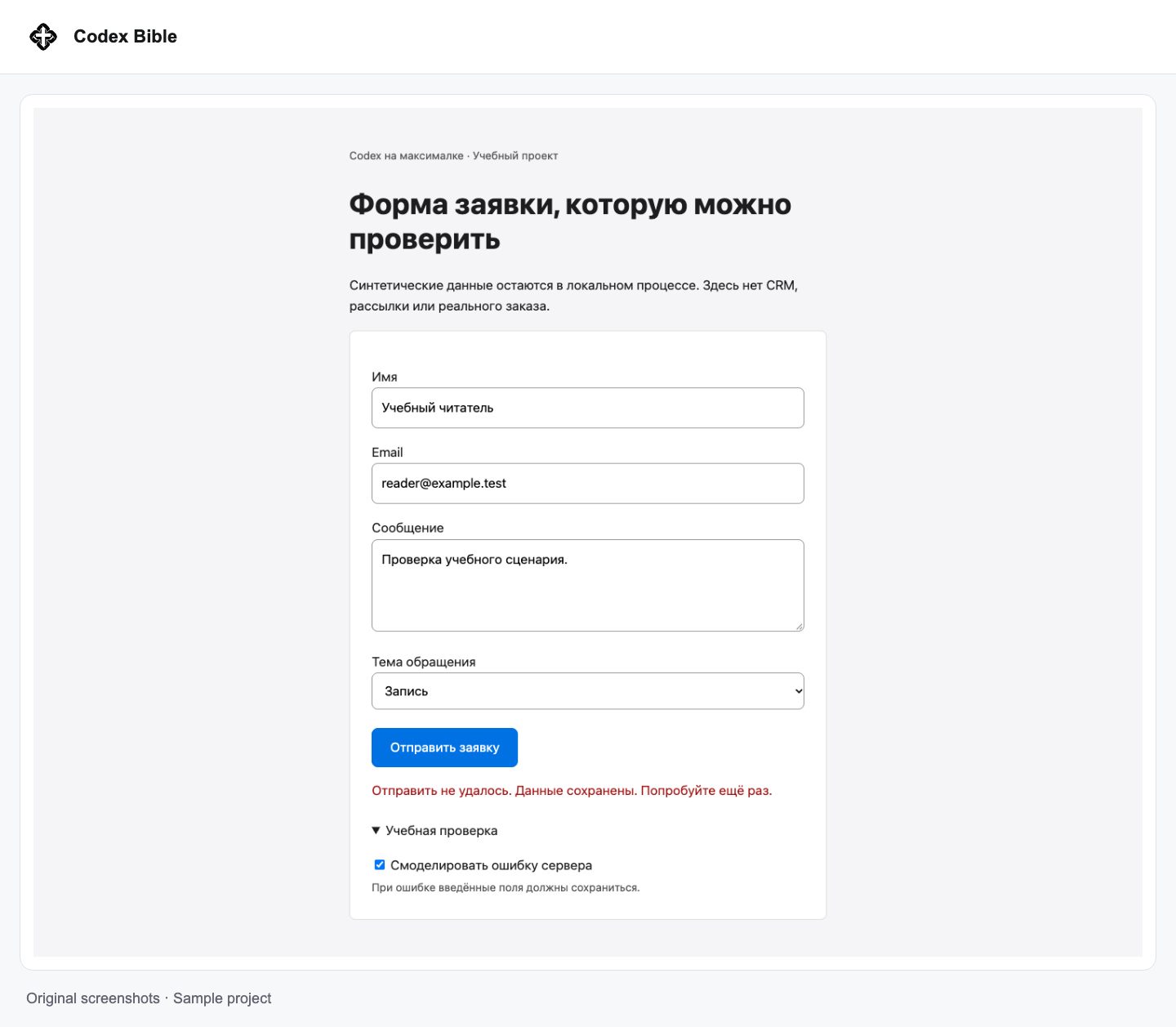
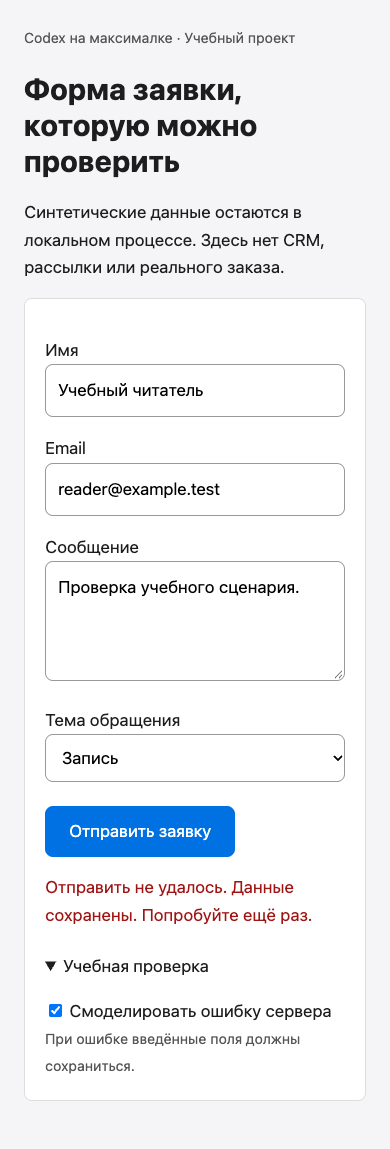
Repeat the old flow and try the new one. Entered data should survive an error, and a success message should correspond to an accepted submission.
Playwright Test suits repeatable browser checks. Codex can save a submission scenario and rerun it after later changes. If the project uses another testing system, extend that first rather than adding an unnecessary second one.
For a separate security review, consider Strix. Start with sample users and access rules in your own test environment. Agree on targets and model costs before active testing. The local folder is writable in Docker, so use a saved separate copy. After choosing a fix, repeat both the forbidden request and an ordinary user action.
Test new and existing flows: valid and invalid input, errors, retries, Tab and a narrow viewport. Trace the handler's response; separately verify storage or delivery where configured.
Find existing browser tests. If the project uses Playwright Test, add a scenario covering this change. If no checks exist, propose an appropriate option and prepare a repeatable test after approval. Save the report and real screenshots without making real payments or sending messages.
Step 7. Prepare the release
Review the finished change and choose the release version. After publishing, repeat the same actions at the live URL; a local preview cannot confirm them.
Find the task materials and fill the bracketed fields yourself from them.
Prepare the checked [project] for release: settings, required data and post-update checks. After an authorised release, repeat the main flow on the live URL.
Step 8. Plan a safe rollback
Practice example
Open the full desktop check screenshot
 Codex Bible
Result and next step
Result: a new function in an existing project, repeated checks and a safe rollback method.
Next: Design a website or app interface.
Find the task materials and fill the bracketed fields yourself from them.
Test rollback for [project] on a copy. Preserve new submissions and data compatibility. If old code cannot handle new data, propose a safe solution instead of deleting records.