Provide publication links and explain your topic. If a publication is private, attach the slides or transcript you can access.
Paste the prompts in order into Codex or Work with access to these materials.
Step 1. How to explain what content you need
Define the audience and result first. “I need views” gives little direction. “I want small café owners to understand which photographs they need for a menu” helps select relevant sources.
The assistant first reads information about you and your successful writing. You should not need to answer the same questionnaire again. If you have no publications yet, use your experience and a few audience tasks.
Help me analyze content in my niche and prepare original topics and a script. Find existing information about me, my audience, product, publications and style in the current project. Ask only for missing context: who we help, which task, which platform and the intended result. Save a short brief in the project. Do not invent my experience, customers or results.
Step 2. Where to find relevant creators and publications
Compare creators serving a similar audience. International examples can help when the task transfers to your market. A famous entertainment channel may not help you sell a local service.
For a first study, consider 3–5 creators and 10–15 publications within an agreed period, such as the last three months. This is a manageable practice sample, not an algorithm rule. Separate short videos from long ones and posts from carousels. Flag news spikes and sponsored content separately.
Find suitable creators and accessible publications using our brief. Start with saved links, then use permitted search. Suggest a limited collection and period, explaining why each creator suits our audience. Separate platforms and formats. Include ordinary publications alongside standout examples for comparison. Show the selection before starting the full analysis.
Step 3. How to choose a reading method without unnecessary connections
Start with accessible text. Captioned YouTube videos offer Show transcript in the description. The assistant can open it through an authorised browser when that capability is available. Instagram and TikTok access depends on the page, sign-in and available tools. Having a link does not mean the speech has been read.
| Method | When it fits | Limitation |
|---|---|---|
| Available text and captions | A small collection or first analysis | Text alone cannot establish the editing or visual treatment |
| Authorised browser | Reading pages and inspecting specific scenes | Use an available session; the owner signs in if none is available |
| Firecrawl | Extracting public page text while retaining source links | Test one page first; a private page or missing captions do not become an accessible transcript |
| Sandcastles or Virlo | Regular collections and reports covering several creators | Check plans, limits, platform coverage and connection method; neither is a required purchase |
With Sandcastles, first check the workspace and existing analyses: search and analysis of a new video consume credits differently. With Virlo, distinguish reading a saved result, running a new search and recurring monitoring. For a long task, save its ID and keep checking that job until the report is ready instead of starting another paid run.
For your own files, WhisperX can help transcribe speech and FFmpeg can extract frames. Neither is needed to read an existing transcript. Do not download other creators' videos for this workflow. Do not send passwords, cookies or session credentials to the chat.
Check which permitted method can read the selected materials. Start with accessible text, captions and the browser. Do not install unnecessary tools. If a paid service is needed, verify features, limits and costs and offer a path without an additional subscription. Get approval before granting access or paying. Do not download other creators' videos or request session credentials.
For public text pages, you can use an available Firecrawl connection. Extract one page first, compare it with the original and save the URL and collection date. Reading a video description is not the same as reading its speech.
Step 4. How to collect trustworthy information
For each publication, keep its link, date, format, accessible text and the date when metrics were observed. Counts change, so an undated snapshot is a poor comparison. Missing data remains unknown, not zero.
A competitor's view count does not reveal retention, leads or sales. Your own analytics may provide more detail, but access requires your approval. The official YouTube captions-download API requires permission to edit the video; it is not universal access to competitors' transcripts.
Save a table of selected publications in the current project: link, creator, publication date, platform, format, duration, accessible metrics and observation date, full-text availability and inspected scenes. Distinguish public data from authorised analytics for my own account. Leave missing values unknown. Update existing records without duplicates. Do not call a link list a completed content analysis.
Step 5. How to analyze the content rather than its headline
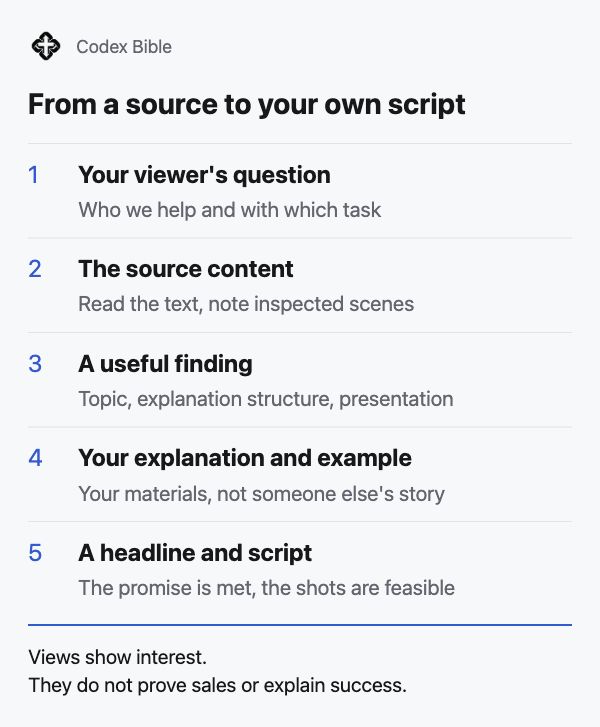
Identify the viewer's question, opening promise, explanation sequence, example and conclusion. A hook is the opening that gives people a reason to keep watching. Speech, on-screen text and imagery may play different roles.
The analysis table records a timestamp or paragraph, spoken content, observed visuals and the finding. A transcript supports speech analysis, not invented camera positions, transitions or on-screen text. Flag any missing demonstration of the result.
Read the full accessible content of the selected publications. For each, identify the viewer's question, opening promise, explanation sequence, example and conclusion. Tie findings to actual paragraphs or timestamps. Describe speech, on-screen text and imagery separately; make visual findings only from inspected scenes. Distinguish facts, creator claims and your hypotheses. Save the analysis after each material.
Step 6. How to compare standout and ordinary publications
Look for useful repeated approaches, not a secret algorithm. Compare similar formats, periods and audiences. A two-day-old video cannot be evaluated like a year-old video. Shorts and long-form view counts are not a single comparable scale.
Separate topic, explanation structure and visual treatment. You might find useful mistake breakdowns but present your own in a different way. An empty format-table cell means “not found in this sample,” not proven demand.
Compare analyzed publications by topic, explanation structure and visual treatment. Compare similar formats and periods. If calculating views relative to a creator's usual level, show the comparison set and formula; omit the number when data is insufficient. Identify useful differences between standout and ordinary materials. Present explanations of performance as hypotheses, not proven growth rules.
Step 7. How to turn findings into original topics
Combine an audience question with something you can demonstrate. You do not need to disagree with a competitor just for attention. A useful difference may be a real example, a clear check or a missing step explained properly.
Practice example, not real performance data: sources recommend attractive menu photos. Your topic becomes “Three shots of a dish you need before building a menu.” Show your own photographs, explain each purpose and check readability. Another creator's topic prompted an original explanation, not a rewrite of their script.
Use the analysis to propose a small collection of original topics matching our brief. For each, show the viewer's question, useful result, source of the idea, our example and what we add. Find suitable materials of mine and ask about missing experience rather than invent it. Remove duplicate topics and those I cannot explain credibly. Help select the first topics to prepare.
Step 8. How to write headlines without empty promises
The headline and opening line should promise what the content actually delivers. “Three dish photographs your menu needs” fits the example. “These photos will double sales” requires evidence we do not have.
Ask for different approaches: a question, a common mistake and a concrete result. Twenty versions of the same sentence are not useful. An assistant's score can support editing but does not predict reach.
For video, align the opening line, on-screen text and picture around one topic. Follow the opening with an explanation or your own example rather than another introduction that delays the promised value.
Give each selected topic three distinct headlines and openings: a question, a mistake and a concrete result. Explain each promise and where the content fulfils it. For video, align the opening line, on-screen text and picture; follow the opening with an explanation or our example. Use my language without copying distinctive phrases from other creators. Remove unsupported numbers, guarantees and exaggerated drama. Explain your recommendation through clarity and substance, not predicted virality.
Step 9. How to get a script you can record
Turn the selected topic into spoken words and a shot plan. Keep one complete idea for a short video. Every insert has a purpose: demonstrate an example, explain an action or verify a result. Do not add decoration just to keep things moving.
For the menu example, open with the task, show three of your own shots and their purposes, then check the menu on a phone. If the photographs do not exist yet, the assistant prepares a shoot list rather than claim they were shown.
Write a script for one selected topic using the approved opening. Find my examples and style rules in the project. Prepare recording text, a shot plan, required materials and a clear conclusion. Separate established facts from material still needing to be recorded or checked. Estimate duration using a trial reading rather than promise exact timing from word count. Apply Humanizer: plain conversational language without filler, borrowed phrases or invented personal history.
Step 10. How to check the result and save it for continuation
Aim for a few useful topics and one recordable script, not hundreds of undeveloped ideas. Check the chain: source → observation → our topic → original example → fulfilled promise. Verify changing service details against official pages.
| Problem | Ask the assistant to do this |
|---|---|
| Only the headline was read | Obtain the content or exclude it from deep analysis |
| Scripts all look alike | Separate general principles from templates and use your own revisions |
| A source is unavailable | Record the limitation and choose an accessible replacement without bypassing protection |
| Sales are inferred from views | Remove the claim; sales require your own analytics |
| An original example is missing | Prepare an example brief rather than borrow someone else's experience |
| A topic does not fit the audience | Return to the brief even when the source has many views |
YouTube transcripts · Captions API limitation.
Result and next step
You have a traceable analysis, original topics, headlines and a script with a clear shot plan. Keep sources and your revisions for future work. Continue with A script in your own voice, then video editing or a carousel.
Paste the final prompt into the same Codex or Work chat:
Check the prepared topics, headlines and script in the current project. Verify sources and changing facts, fulfil the approved opening's promise and remove repetition and unsupported claims. Save the editable script, shot plan and missing-material list. Keep my approved revisions for future writing and preserve previous versions. Show what is ready to record and what still needs checking. Do not publish without a separate instruction.
